ETS|ATS Mod Manager
Free · for Windows 10 and 11

Mods for ETS2 and ATS
fully under control

Build your own set from folder and Steam Workshop mods, put them in the right order and find out in plain words why the game crashed. All in one window.

Latest version
  • All features are free
  • 16 interface languages
  • Updates right inside the program
ETS|ATS Mod Manager

What the manager does

Everything you need for a mod build, from load order to crash analysis.

Auto-order with explanations

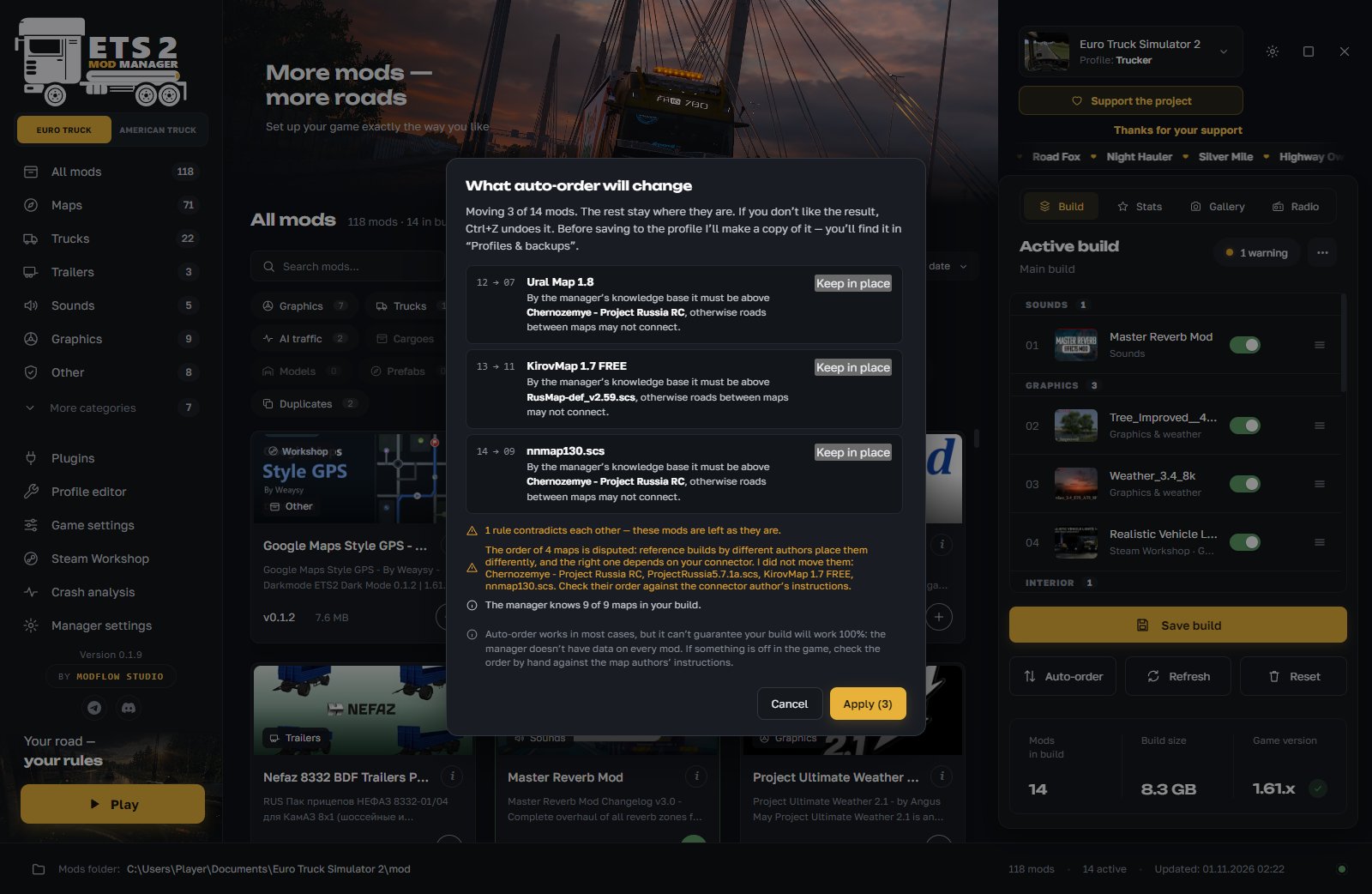
One button puts the mods in order. Before applying, you see what moves and why. You can leave any mod where it is and undo the result with Ctrl+Z. The manager takes into account map guides, mod contents and how other players most often arrange mods. It is a hint, not a guarantee: we do not promise a 100% working build.

Crash analysis in plain words

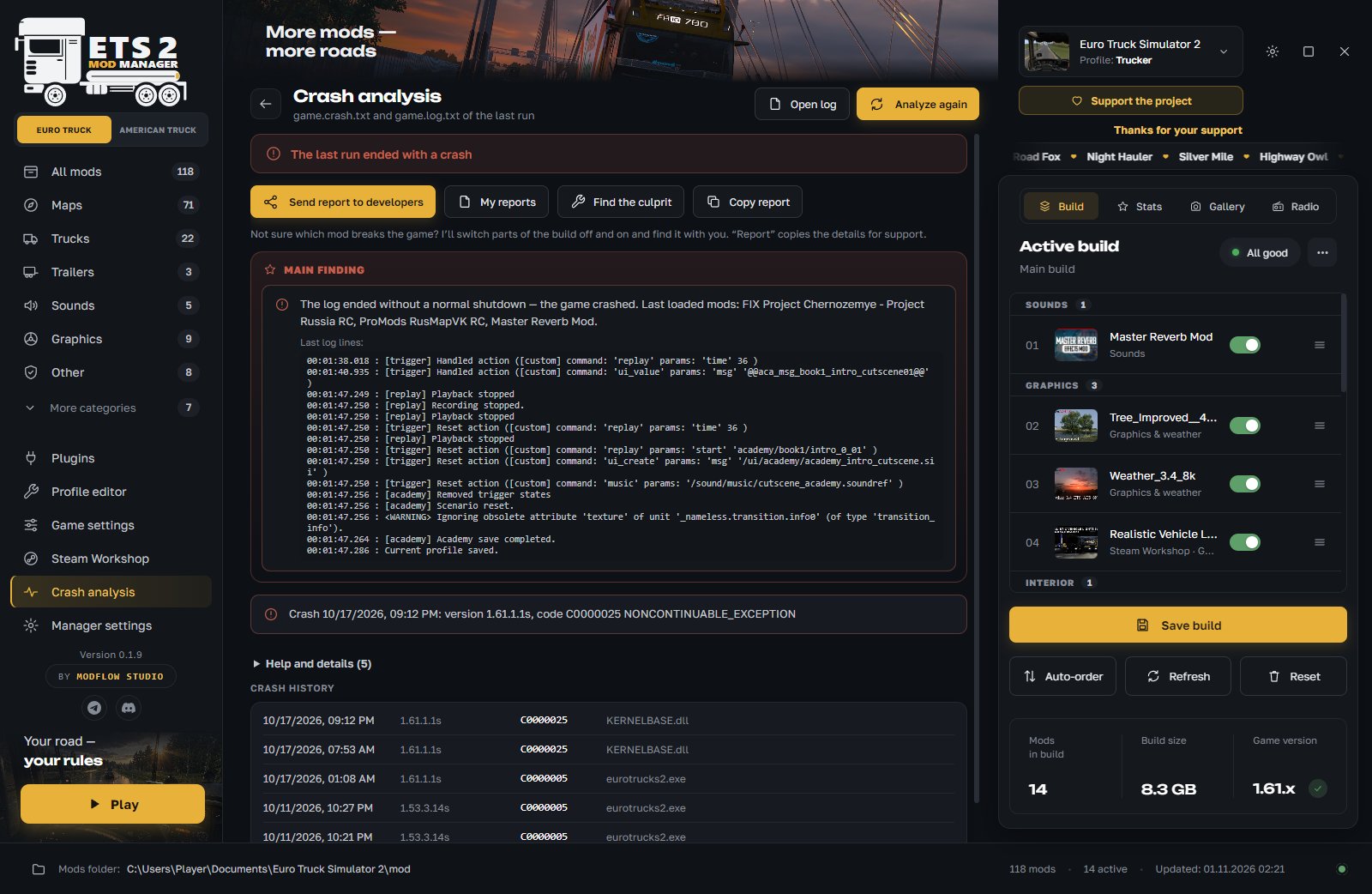
Reads the game logs and explains what broke: a mod, a plugin, a driver or low memory. “Find the culprit” turns parts of the build off one by one. You can send a report to the developers from the program, and the reply comes back into the manager.

All mods in one window

Mods from the mod folder and Steam Workshop: categories, search, pictures and descriptions. Install by dragging .scs, .zip or a mod folder.

Builds and checks

Save several builds and switch quickly. The manager warns you if a mod is not for your game version, a DLC is missing or files are duplicated. You can share a build as a .tmod file.

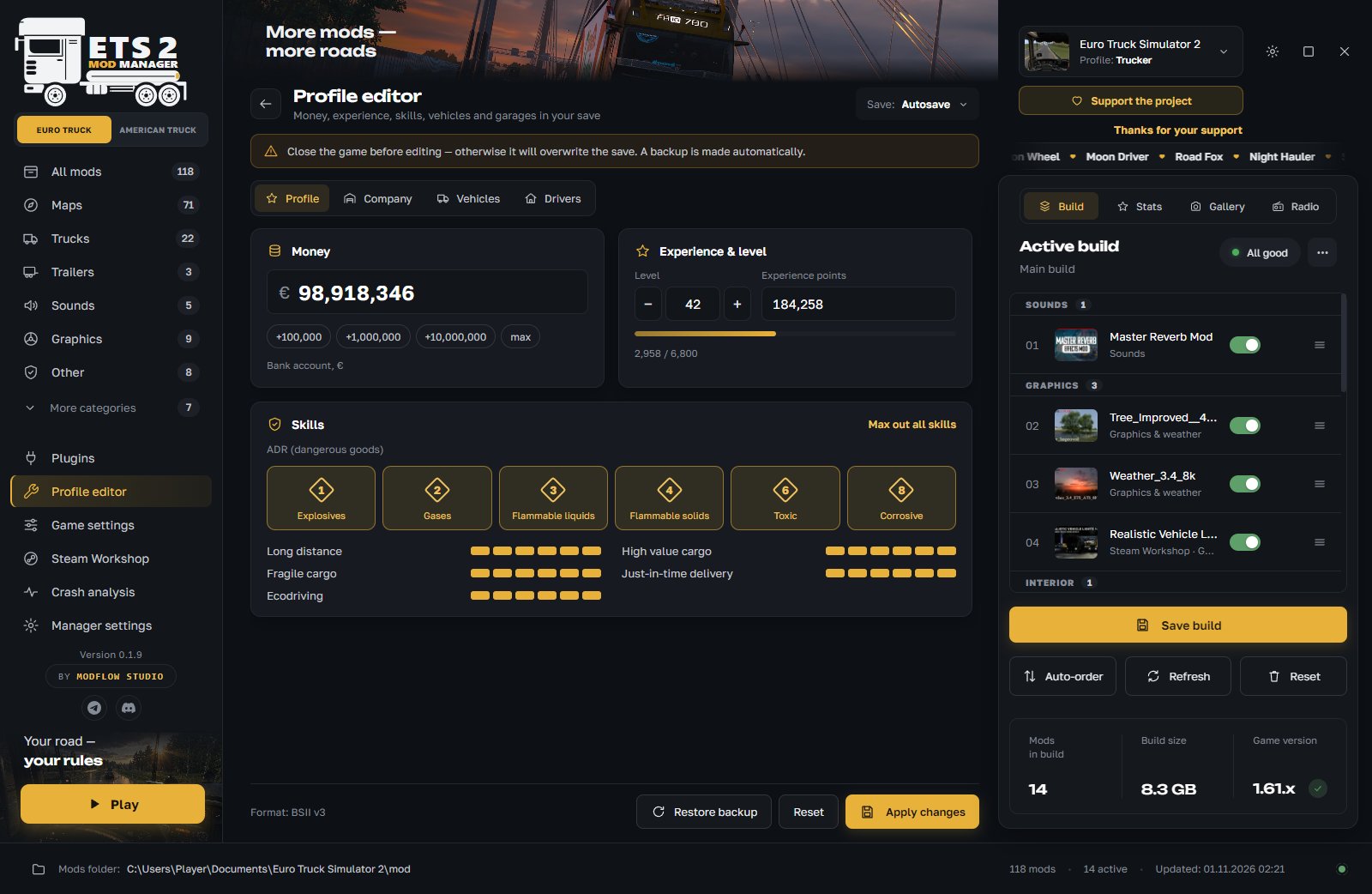
Profile editor

Money, experience, skills, ADR, repair and refuel, cities and garages. The manager makes a save backup before every edit.

Two games in one program

Euro Truck Simulator 2 and American Truck Simulator switch with one button, and each game has its own mods, profiles and builds. ATS support is still in development and may be unstable.

And much more

Game plugins, radio, profile statistics, a screenshot gallery, game settings (optimization and buffer size), a 3D truck viewer (trial version), notes and tags for mods, launching the game without mods.

What it looks like

Real program windows. Click a picture to enlarge it.

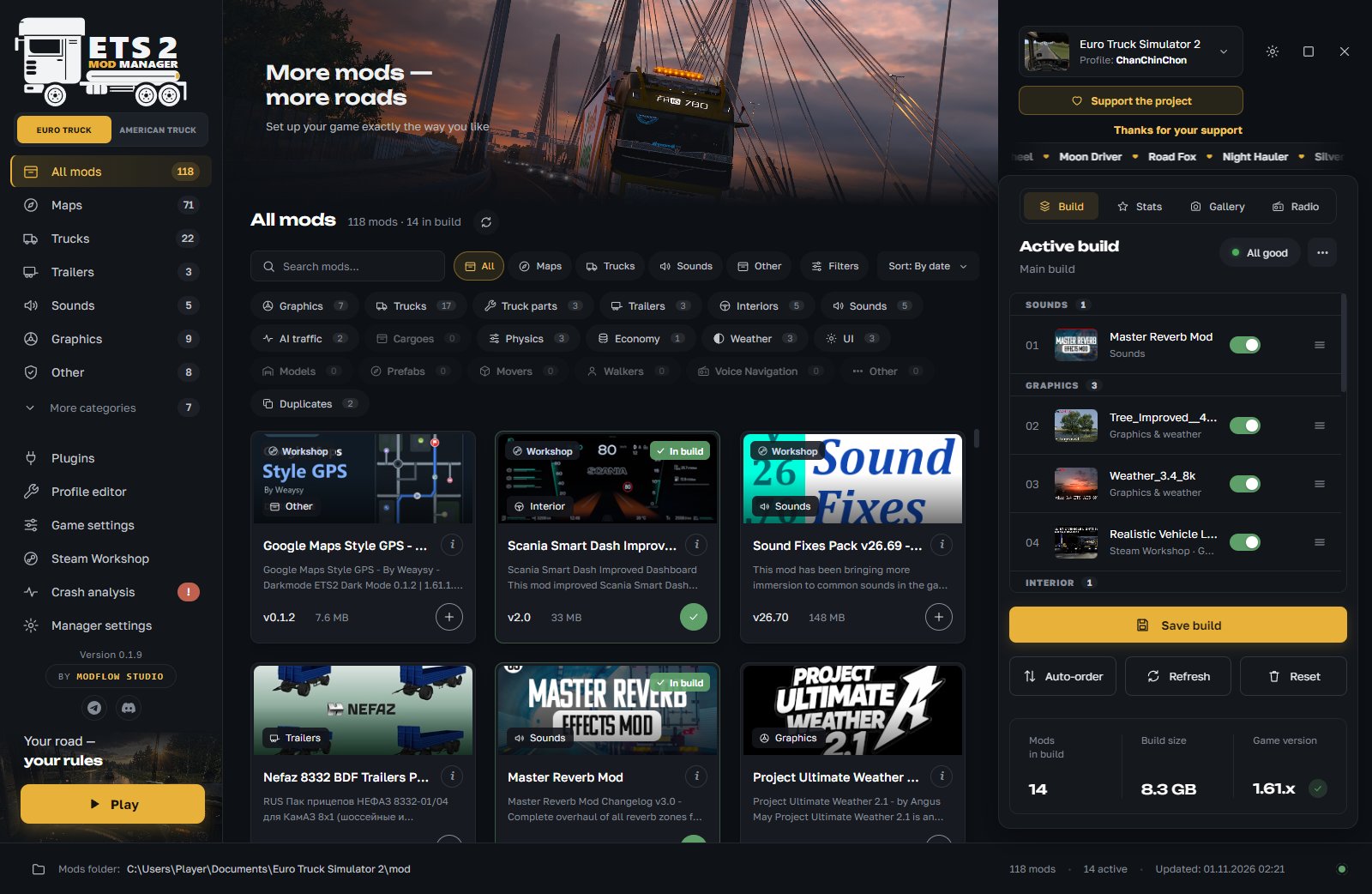
  1. Catalog

    All mods and your build side by side: add them with “+”, by dragging, or straight from Steam Workshop.

  2. Auto-order

    Before applying, you see what moves and why. Any mod can stay where it is.

  3. Crash analysis

    The main finding is on top, suspicious mods are visible at once and turn off with one button.

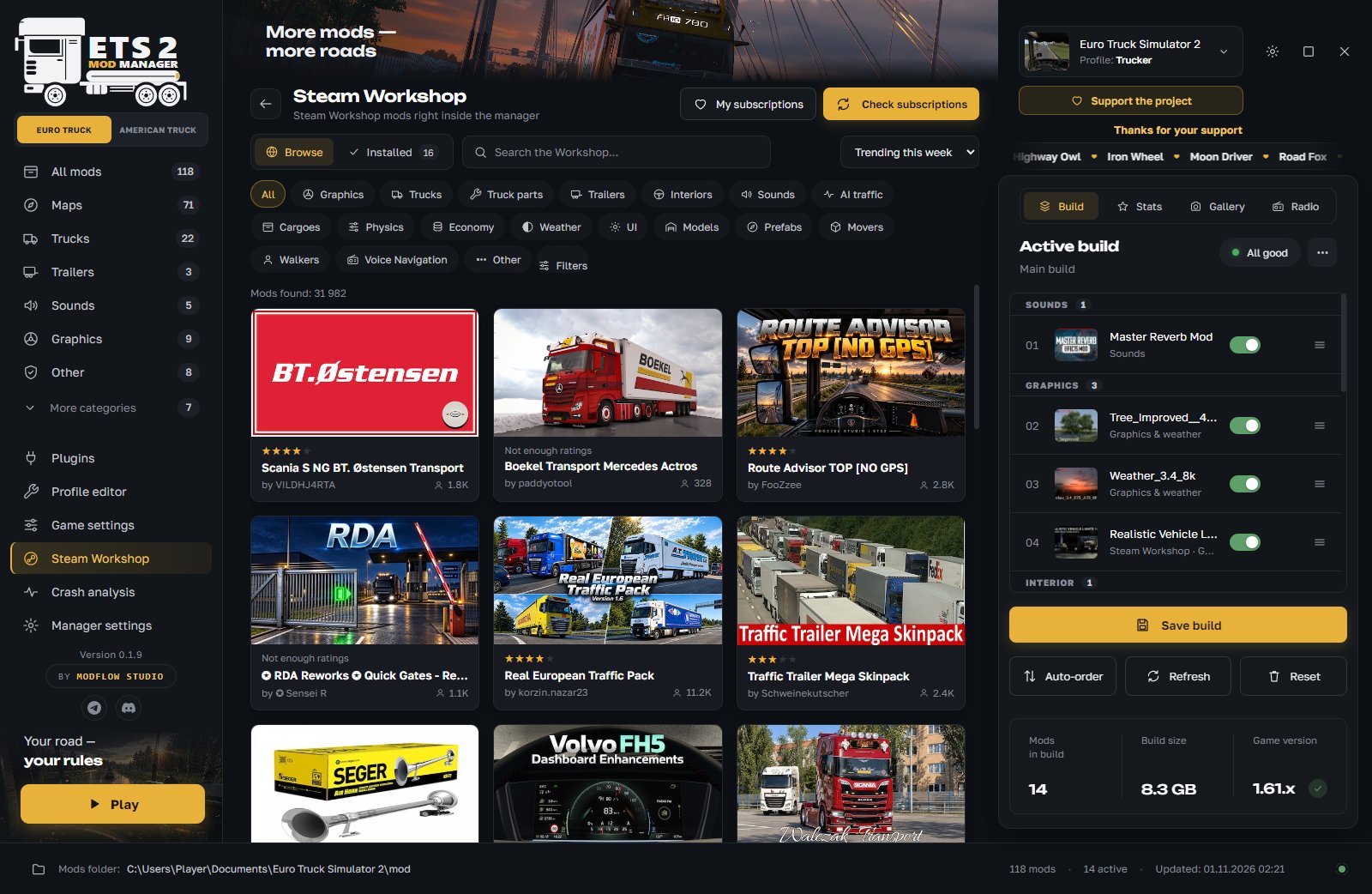
  4. Steam Workshop

    Steam Workshop inside the manager: search, categories, subscriptions.

  5. Profile editor

    Money, experience, skills, vehicles and garages. A save backup is made before editing.

01 / 05

How auto-order works

Mod order matters: if two mods change the same files, the one higher in the list wins.

  1. 1

    What it knows

    The manager knows the order of popular maps and reference builds, reads mod contents and takes into account how other players most often arrange mods.

  2. 2

    A plan with reasons

    Before applying you see a list: which mod moves where and why. Nothing changes until you press “Apply”.

  3. 3

    You decide

    Any mod can be pinned with “Do not move”, and the change can be undone with Ctrl+Z. A copy of the profile is made before saving.

Auto-order works in most cases but does not guarantee that your builds work 100%. If something is wrong, check the order by hand using the map authors’ instructions.

What’s new

The latest version and its changes.

Loading the release notes…

All versions on GitHub →

Download

A free installer for Windows. There is no portable version.

Download installer≈ 90 MB
  1. Download and run the installer.
  2. If Windows shows a warning, click “More info” and “Run anyway”. The program does not have a paid publisher signature yet.
  3. On the first launch, read the user agreement and press “Accept”.
  4. The manager finds the game and profiles by itself. After that it updates with the “Update!” button inside the program.

Windows 10 or 11 · Euro Truck Simulator 2 and/or American Truck Simulator (Steam)

FAQ

Is it free?

Yes. All features are available at once, without subscriptions, paid tiers or early access. If you want to support the project, there is an “I want to support the project” button.

Windows warns about the installer. Is it a virus?

No. The program does not have a paid publisher signature, so Windows shows a warning for any unsigned program. Click “More info” and “Run anyway”. You can scan the installer on VirusTotal.

What data do you collect?

We do not collect personal data (name, email, passwords, contents of personal files, Steam logins). To improve the manager, anonymous statistics are sent: versions, names of installed mods and their order, which features are used, error information. You can turn it off in the manager settings. Details are in the agreement.

Does auto-order guarantee that mods will work?

No. It is a hint that takes into account guides, mod contents and the experience of other players. It cannot know everything, so before applying it shows what moves and why.

Does it work with ATS?

Yes, there is an ETS2 and ATS switch, and each game has its own mods, profiles and builds. ATS support is still in development and may be unstable, and the order base for ATS is smaller than for ETS2.

Do I need Steam?

The manager works with mods from the game folder and can show Steam Workshop. Workshop needs Steam with the game purchased.

The game crashes. What should I do?

Open “Crash analysis”: the manager explains what broke and shows suspicious mods. If the cause is unclear, start the game without mods (build menu) and use “Find the culprit”. You can send a report to the developers with a button in the same section.

Which mods are supported?

.scs and .zip files and mod folders with manifest.sii. .rar archives are not supported.

Is this the official SCS Software program?

No. The manager is made by ModFlow Studio and is not affiliated with SCS Software, Valve, TruckersMP or the authors of mods and maps.

The manager is made by ModFlow Studio. We post update news, developer replies and help with mods in our channels.

Thanks to everyone who supported the project.